
The Bash source is an in-built command used to read and execute commands from a file and, in some cases, pass them as arguments in the current shell. You can load functions and variables into the current shell scripts with the source command. Moreover, you can use the source command on the terminal or in a bash script, especially to load functions and variables from other functions.
When used in the terminal to execute a given script, the script gets executed in the same shell from where it gets sourced. Therefore, the script can access all variables in the shell where they have been sourced. In this case, the source replaces the period (.) used when executing a bash script.
However, if you just execute a script by typing its name or using the bash command, a new instance gets created, and the script can only access exported variables or those in its parent shell.
How to use the source command
You can use the source command when working with bash scripts in various ways.
1. Executing Functions on Terminal
If you have a bash script, you can use source to execute it instead of using a period. The syntax for that is shown below.
Look at the example below, where we’ve executed a bash script using source and period.
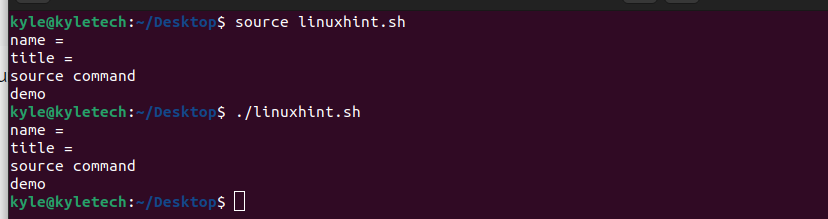 The two outputs are the same in executing the script. However, with source, you can use the current and the parent variables, even those defined, without using the export keyword.
2. Importing Functions on Another Script
You can also execute functions in another bash script to build a library of functions. Let’s have a script named demo1.sh with one function that prints the uptime.
 Let’s create another script, verify.sh. If we needed to access the function from another bash script, we could achieve that using the source command. You first source the name of the file.
Once that is done, you can proceed to use functions from the other script on the current script.
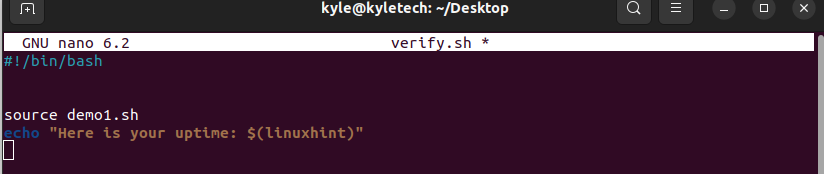 You can execute the script on the terminal to confirm that it works.

3. Importing Functions on Terminal
You can also import a function into the current shell. To do that, you first source the file.
Once you have the file imported, use its functions on the terminal.

4. Updating Variable Values
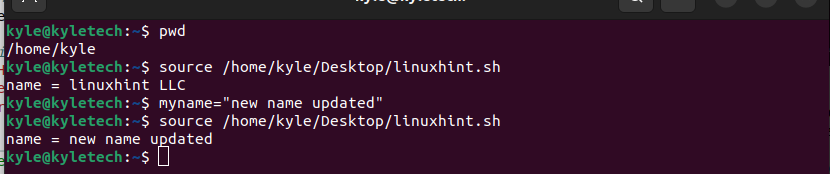
Suppose you needed to update the values of variables in a given script regardless of its location. In that case, you could source the script, then update the variable without using the export command. In this example, we are updating a script named linuxhint.sh
Let’s start by sourcing the file, and we can do that by adding its full path.
 Once we’ve sourced it, go ahead and update the variable.
 Execute the script using the source command to verify the updates.
5. Passing Environmental Variables
When using Source, you can also import environmental variables when writing a script. You could choose to read and set various environmental variables, or collect any variable from the imported file, and use it in your script.
In such a case, all you need to do is to source the path to the environmental variable; from there, you can use any of its functions.
For instance, let’s create a script that sources the ~/. bashrc and gets a value from the imported environmental variable.
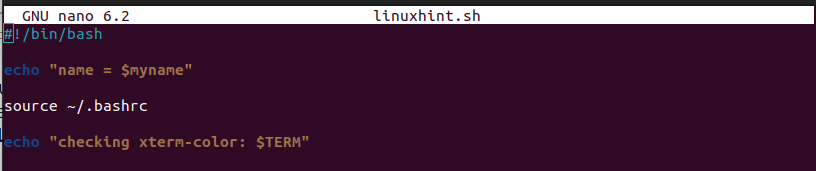 Executing the script gives a value from the imported environmental variable file, as shown in the image below.
 Those are the common uses of the Bash source command.
Conclusion
The source command is a helpful bash command that lets you easily work with scripts. We’ve seen how you can use it to execute Bash scripts, import functions, update variables, and pass environmental variables from a file. Try using the source file following the examples provided in the article, and if you get stuck, refer to the man page for more clarity.
