When working with commands in bash, you will reach a point where you must use the output of a given command as a value for a given variable. Command expansion is a term used to refer to command substitution where the output of a given command gets used in place of the command. Ideally, the command gets executed, and its value replaces the command, and in most cases, it is used when working with variables.
Bash command expansion comes in handy when you must use a given variable whose values are yet to be known unless the command first executes. This guide covers various examples to help understand how to work with bash command substitution.
How to use Bash Command Expansion
Command expansion can be used in two ways.
You can enclose it as in the syntax below:
Alternatively, you can use backticks, as shown below.
When you use bash substitution in a script, the output of the command will replace the command when it executes.
For instance, if you need to write a command that prints the current date and time and the uptime when executing the script, we could have a script written as shown below.
 We’ve created a variable in the script, but its value depends on the command’s output. Also, we are printing the value of the declared variable using the echo command. That’s a case of bash command substitution. Let’s execute the command and see how it behaves.
 Note that any trailing lines when printing the output get deleted when you use command substitution. For instance, let’s use the seq command to print values from 1 to 10, skipping two values. If we run the command below, we will note that each new line gets accounted for.
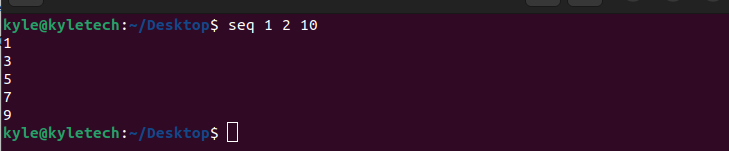 However, if you use command substitution for the same command, the output would be different as the new lines get deleted.

Bash Command Expansion on Loops
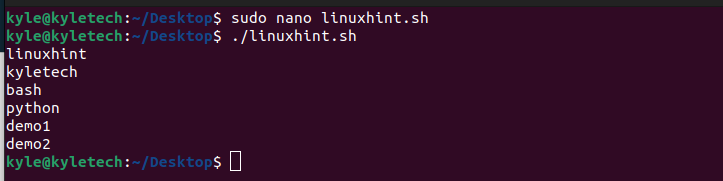
If you have a given script that should execute a given task, but the values of that variable depend on the output of the command, you can use the bash expansion. For instance, if you had a file containing the names of IP addresses, you could run a for loop to perform a given task based on the names of that file.
The script below opens a file using the cat command and prints the file’s contents on the current shell.
 Here’s the output confirming that you can use bash substitution with loops.
Command Expansion and Parameter Expansion
Bash command expansion is almost similar to the parameter expansion. In bash substitution, we use $(), while for parameter expansion, we use ${}. The parameter expansion protects a variable from command expansion. Let’s have an example to understand.
 In the example above, we are creating a variable named date. If we echo the variable using the parameter expansion, we get that we print the variable’s value followed by the word added after the variable value.
However, in the command substitution example, we see that the command date, which prints the current date and time, gets substituted, and the output is used in place of the command.
So, if you don’t want a variable to be treated as a case of command expansion, use ${} instead of $().
Conclusion
Bash command expansion is the same as command substitution. This guide has explained what command expansion means, and we’ve given various examples to help understand how you can use command expansion for your bash scripts. The key takeaway is that command substitution is when the output of a command is used in place of the command itself when getting or setting the value of a variable.
